Row Level Security (RLS) determines which level of data a user can view when they open a Report in the BOLD Improvement Portal. Organization administrators have the ability to edit the RLS Role assigned to users in their organization following the directions here.
Please carefully read the description of each RLS role below and discuss with your EK12 point of contact before selecting the RLS role(s) that are the best fit for your organization's data privacy practices and data culture.
LEA
Users assigned the RLS role of LEA will view all data related to the organization for any reports they have access to view.
- This role is the best fit for most users at most organizations.
- If you are a single-site LEA with only one school or campus, this is the role you should select.
- We recommend this role for multi-school LEAs to encourage healthy data analysis conversations across campuses and to provide opportunities for growth and learning within a network.
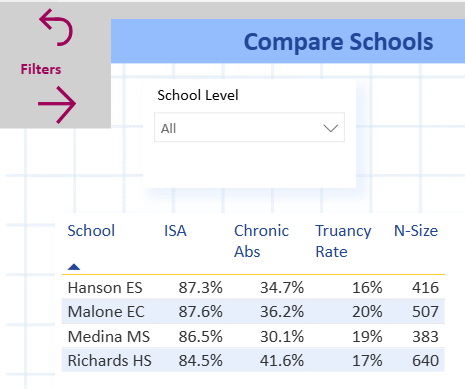
Below is an example of what a user with the LEA RLS role would see in the Attendance Report from a demo school district. Users could compare attendance across all schools in the LEA when they access the report.
School
Users assigned the RLS role of School will view data for only the school(s) they have been assigned for any reports they have access to view.
- Single school LEAs should use the LEA role (see above).
- An example use case would be a data culture where school leaders and teachers can view schools across the same grade band i.e. all elementary campuses, but the LEA does not want users seeing data for middle school campuses.
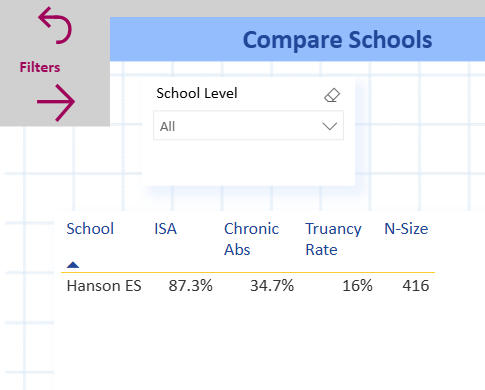
Below is an example of what a user with the School RLS role would see in the Attendance Report from a demo school district. Users would only see the school(s) they have been assigned (in this example only Hanson ES) when they access the report, even on pages designed to show multiple schools at once.
Cohort
Users assigned the RLS role of Cohort will view data only for the cohort(s) they have been assigned for any reports they have access to view. Cohort refers to an organization specific grouping system such as homerooms or houses assigned through a Student Information System (SIS) to specific staff members and specific students.
- Please speak directly to your data manager or an EK12 staff member to know how the Cohort field is being used for your organization.
- Check the filter pane in a Report on the BOLD Improvement Portal to make sure you are entering the Cohort names exactly as they appear from the drop-down list for your organization if you are the Organization Administrator and are managing users.
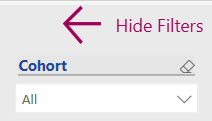
Below is an example of what a user with the Cohort RLS role would see in the Attendance Report from a demo school district. Users would only see data for the cohort they have been assigned when they access the report.
Warning!
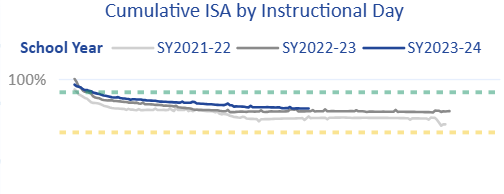
This role could lead to inaccurate data analysis because report pages with aggregate views, such as a school's in-seat attendance rate (ISA) will display the average of the ISA for only the cohort(s) this specific user has access to view.
Student
Users assigned the RLS role of Student will view data only for the student(s) they have been assigned for any reports they have access to view.
- We do not presently have any school partners using this level of RLS.
- This level of security assigns specific students to specific staff members and makes it difficult to compare across student groups from an equity lens or to correctly analyze historical trends.
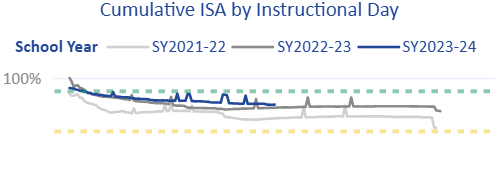
Below is an example of what a user with the Student RLS role would see in the Attendance Report from a demo school district. Users would only see the student(s) they have been assigned when they access the report.
Warning!
This role could lead to inaccurate data analysis because report pages with aggregate views, such as a school's in-seat attendance rate (ISA) will display the average of the ISA for only the student(s) this specific user has access to view.
Board
This role should be assigned to board members who have access to the BOLD Improvement Portal for the purposes of viewing specific Reports assigned to a board report permission group to improve data transparency between the board and school leaders.
- Board members should not have access to view student level data due to FERPA data privacy guidelines.
- We highly recommend that board members are given email addresses using your organization's domain so the Organization Admin can add and remove board members easily from the My Org page as needed.
Done managing users? To return to the My Data page, click the EmpowerK12 logo in the top left or the My Data link in the top right of the screen.
Was this article helpful?
That’s Great!
Thank you for your feedback
Sorry! We couldn't be helpful
Thank you for your feedback
Feedback sent
We appreciate your effort and will try to fix the article